
PRODUCT FILM / THE REMOTE LOOP
A real investigation: inspect server signals, review a command, and separate findings from unknowns. English captions · 44 seconds.
Open video in a new tab ↗Ark is an AI-native terminal and SSH client for remote servers. CLI, SFTP file transfer, server state, and Agent share one real connection. State the goal; it gathers evidence on the server, moves the work forward, and returns the result for your confirmation.
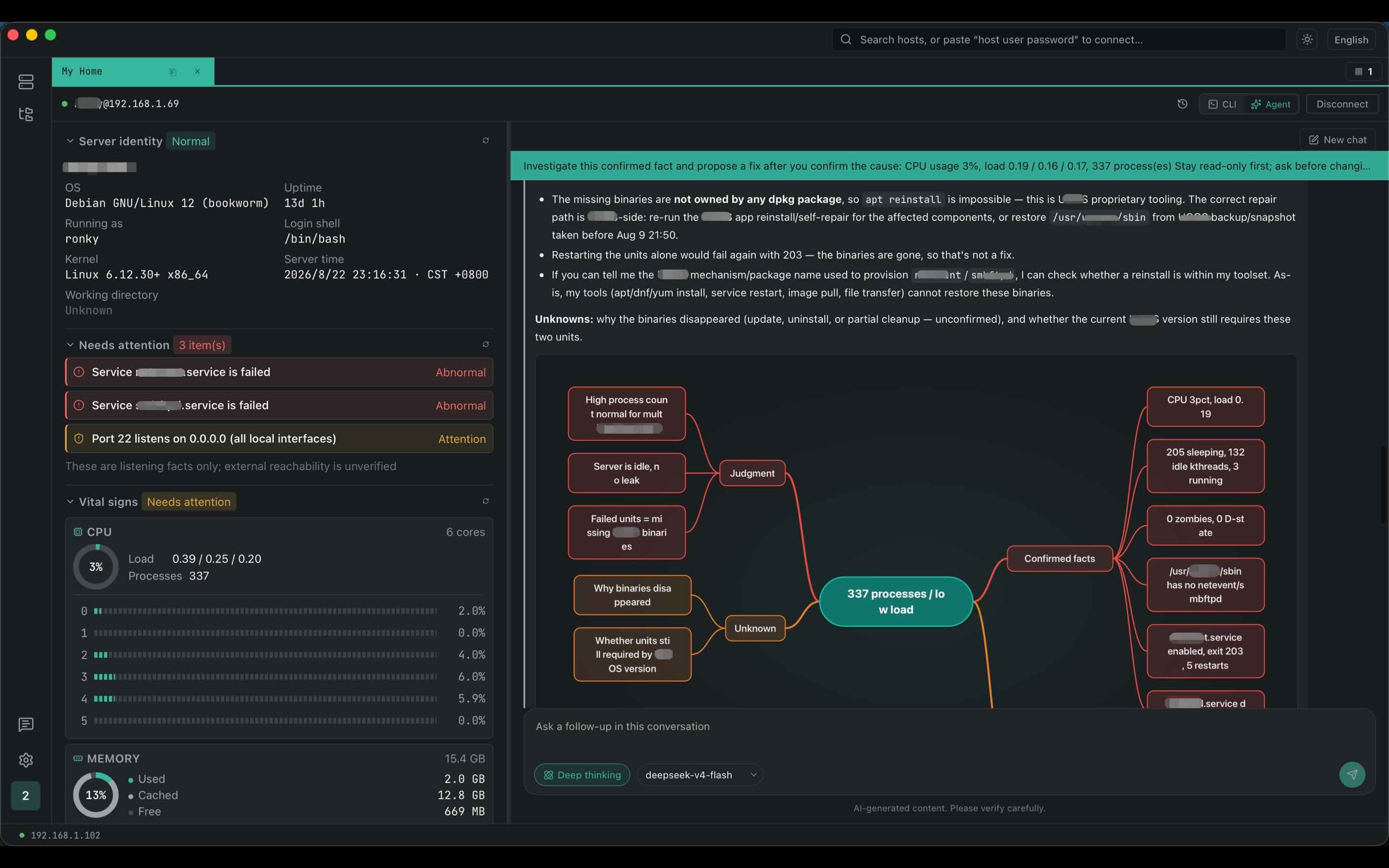
A typical AI waits for you to explain the background. Ark starts from the server you already connected: identity, directories, services, ports, and recent output share one context.
The model understands the goal. Harness connects the current environment, uses the tools, and leaves a traceable record of each run.
A real investigation: inspect server signals, review a command, and separate findings from unknowns. English captions · 44 seconds.
Open video in a new tab ↗$ docker logs helpdesk | grep 401
GET /api/categories 401
$ curl $CONSOLE_URL/...
405 Method Not Allowed
_
FIELD Service healthy, page reachable
PROOF Endpoint has returned 401 since startup
CAUSE The ticket URL contains one extra path segment
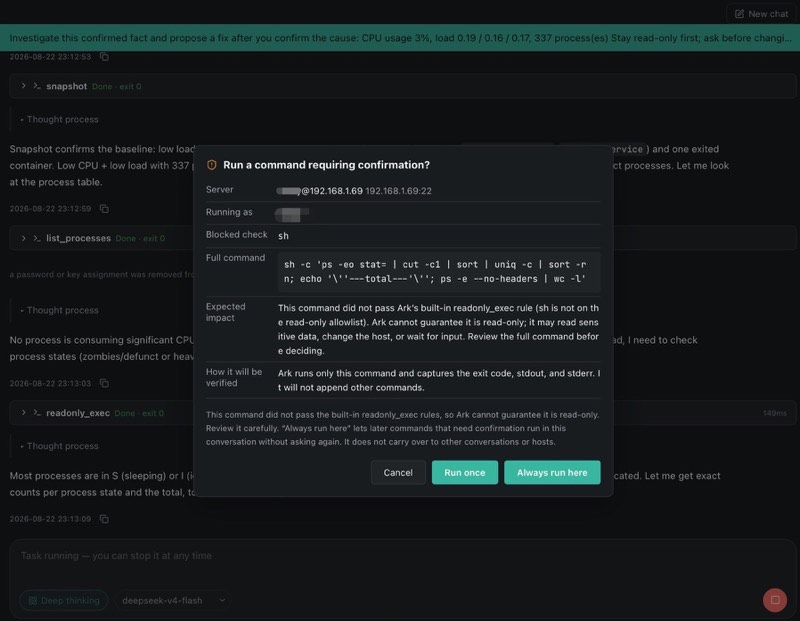
Trust is more than saying “secure.” Before and after every change, you should know what Ark is doing and whether the result actually holds.
Server, identity, target, full command, expected impact, and verification method.
Each confirmation authorizes only the explicit operation in front of you.
Separate execution success, technical verification, and business health.
When Agent is not the right fit, take over the full workflow.
SSH keys and passwords stay on your device; custom model API keys are used only with the endpoint you configure and are not uploaded to Ark.
Shell, splits, history, and completion keep the terminal workflow familiar.
01Browse and transfer with SFTP without switching apps; pause, resume, and retry queues.
02See identity, resources, services, ports, and watch items before deciding what to do.
03Import existing host settings and avoid re-entering connection details.
04Each audience has a concrete path: from one goal, to field facts, action, and a verified result.
An endpoint keeps returning 401. Find the cause and verify the result.
Accounts registered by November 30, 2026 receive Basic access through the promotional period. The promotion does not auto-renew or charge you; without a paid subscription, the account returns to Free when it ends.
A complete terminal. Connect and get to work.
An Agent on the scene. It finds the cause and brings back proof.
From a single host to command of the whole field. Inspections on watch. Work that continues on your device while Ark is running.
Both. Ark is a complete SSH client and terminal you can use on its own, plus an Agent that works from the server you already connected. Nothing requires you to use the Agent.
macOS 12 or later on Apple Silicon and Intel, and Windows x64. We publish a signed installer for each system. macOS is also on the Mac App Store outside mainland China. Pro includes an iOS companion that pairs over the local network and is available on the App Store. An Android companion is in development.
Yes. The Free plan covers SSH and CLI sessions, SFTP file transfer, unlimited connected hosts, local history, and multi-device sign-in without cloud sync.
Yes. You browse and transfer files next to the terminal instead of switching to a separate app, and transfer queues can be paused, resumed, and retried.
On your device. SSH private keys and passwords stay on your device. Your custom model API key is sent only as needed to the model endpoint you configure; it is not uploaded to Ark. Local-network pairing copies them between your devices and does not go through Ark's cloud.
Yes. Ark imports host settings from your existing SSH configuration, so you do not re-enter addresses, users, and authentication details.
You bring your own API key. Basic lets you configure custom models, so the provider and the key stay under your control.
Currently only the OpenAI-compatible API. More protocols are rolling out; stay tuned.
Yes. Ollama also speaks the OpenAI-compatible API, so it works the same way. See the Ollama website for installation.
Free is $0. Basic is $1.99 per month and Pro is $4.99 per month. Accounts registered by November 30, 2026 receive Basic access through the promotional period. The promotion does not auto-renew or charge you; without a paid subscription, the account returns to Free when it ends.
Paid plans are monthly and auto-renew until you cancel. You can cancel anytime; the current period stays active, then the account returns to Free. Website and direct-download purchases go through Stripe. The Mac App Store version follows Apple’s subscription rules and shows store prices. Model usage is billed by your provider.
Ark, Ark SSH, and arkssh are the same app. The official site is arkapp.ai. People also search for Ark AI, AI Ark, AI SSH, SSH AI, and arkapp. On the App Store it is listed as Ark SSH.